
Thread and Zigbee keep coming up in smart home conversations, and if you’ve spent any time shopping for devices or building a home automation setup, you’ve probably wondered which one actually matters. Both run on the same 2.4 GHz radio standard and both mesh their way through your home, but they split apart right above the radio. After testing devices running both protocols and living with both systems, I’ll walk you through what separates them and which one makes sense for your setup right now.
The short version is this. Zigbee is the mature, battle-tested standard behind a very large share of today’s smart home devices. Thread is the newer network layer part of the Matter standard, which is the industry push toward device interoperability. Neither one is wrong, but the choice depends on what you’re actually trying to build.
What Zigbee and Thread Have in Common
Zigbee and Thread share the same radio. Both are IEEE 802.15.4, a low power wireless standard that runs on the 2.4 GHz band. That means the same frequency, the same low data rates, and the same kind of small, frequent messages.
Both also use mesh networking. Mains powered devices act as routers and pass messages along, so the network heals itself when a device drops out. Battery powered devices sleep most of the time and let a nearby router handle their traffic.
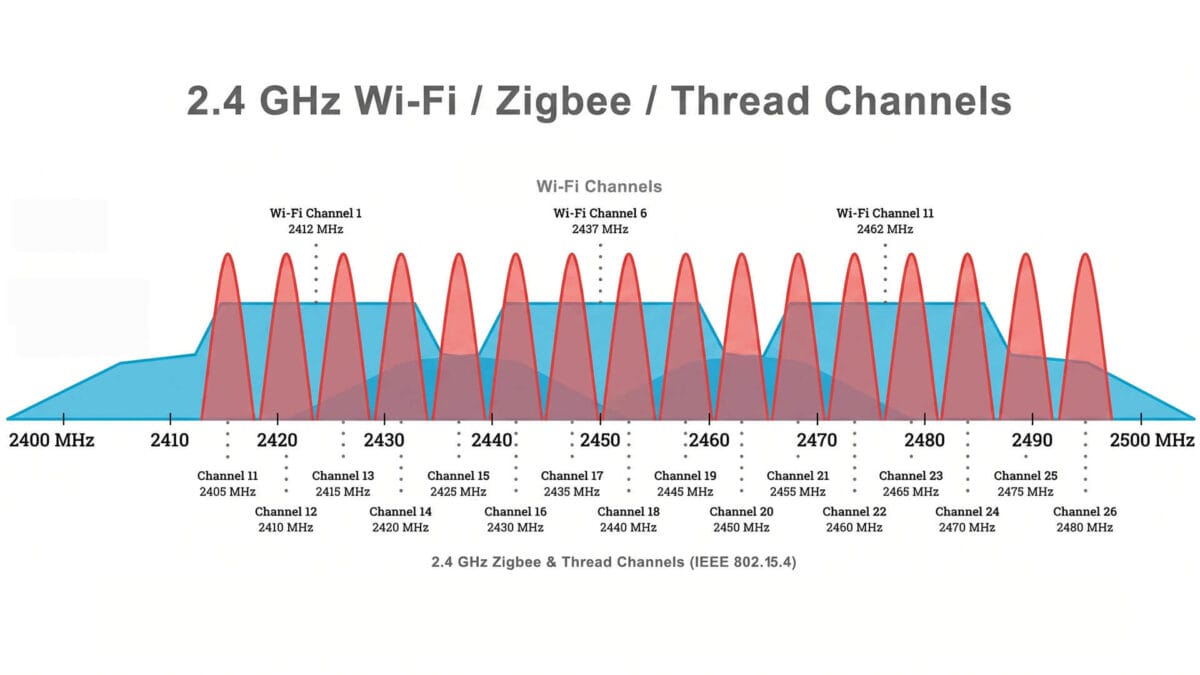
The shared band has one downside. Wi-Fi and Bluetooth use 2.4 GHz too, so a crowded Wi-Fi channel can hurt a Zigbee network and a Thread network in the same way. The real differences start above the radio, in how each protocol builds a network and what it does with the messages.
How Zigbee Works
Zigbee has been the dominant mesh protocol in smart homes for nearly twenty years. When you buy a Philips Hue bulb, an IKEA Tradfri light, an Aqara sensor, or a SmartThings device, chances are it runs on Zigbee. That’s not because it’s perfect. It works reliably at scale, and manufacturers have spent two decades building tools and ecosystem around it.
Zigbee is a self-contained package. On top of the shared radio, it defines its own network layer, its own security, and its own application layer, which describes what a light, a sensor, or a switch can do. A Zigbee device knows how to talk to a Zigbee coordinator, how to relay messages through other devices, how to report sensor data, and how to receive commands. You pair a device, it joins the network, and it works.
Every Zigbee network has three kinds of devices. The coordinator forms the network and manages its security keys. Routers are mains powered devices such as switches and plugs that relay messages. End devices are battery powered sensors that sleep and check in with a parent router. In a typical Home Assistant setup, the coordinator is usually a USB dongle running Zigbee2MQTT or ZHA.
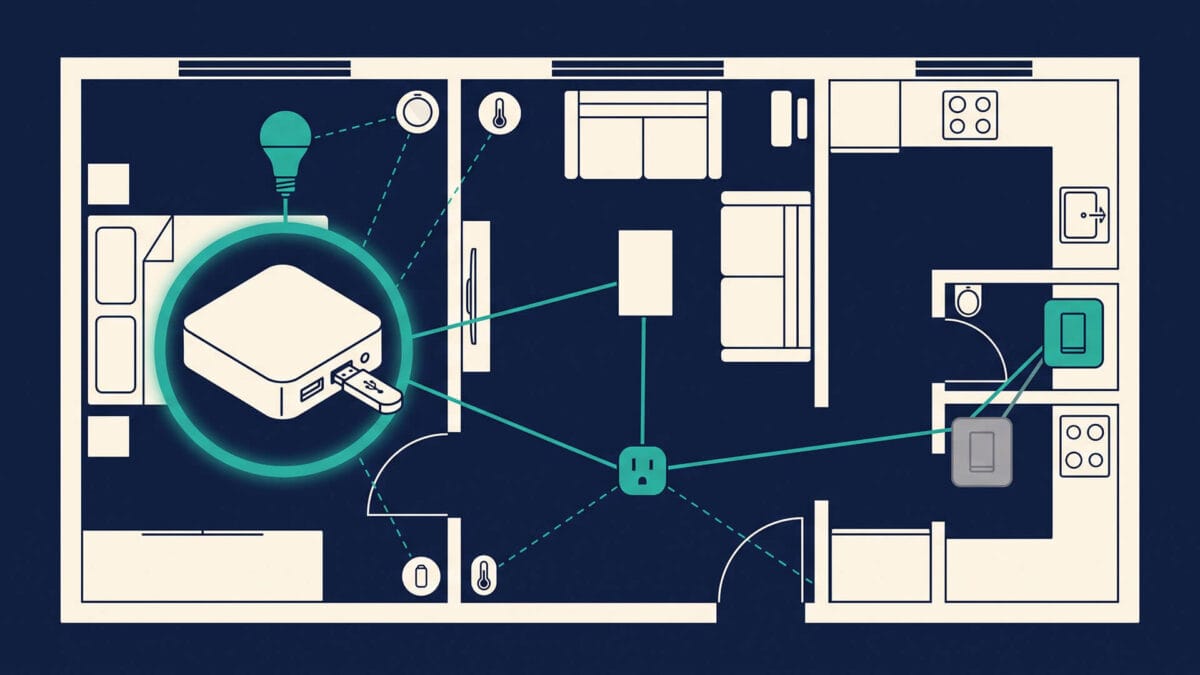
The battery life on Zigbee devices is very good. Motion sensors, door contacts, and temperature sensors often last two years or more on a single coin cell, depending on the device and how often it reports. Sleeping end devices only wake up to report or check for messages, and that is where the savings come from. If a router drops out, the network routes around it, and adding more mains powered routers usually makes the mesh stronger.
Zigbee has one significant limitation. It belongs entirely to Zigbee. A Zigbee light does not speak Matter natively, and a Zigbee sensor does not show up on a Thread network. Manufacturers who want to add support for other protocols have to build bridges or gateways. This is an architectural choice that made sense when Zigbee was the only reliable low power mesh around.
Zigbee Pros and Cons
Zigbee’s strengths come from its age, and so do its limits.
Pros
- Mature and battle tested, with two decades of real world use
- Very large device range, from bulbs and plugs to sensors, blinds, and remotes across many brands
- Low hardware cost, including inexpensive USB coordinators and sensors
- Long battery life on sleepy devices such as door contacts and motion sensors
- Fully local control with no cloud required
- Strong Home Assistant support through Zigbee2MQTT and ZHA
Cons
- Depends on a single coordinator, and losing it without a backup of the network settings can mean re-pairing your devices
- Not IP based, so reaching other ecosystems, including Matter, needs a bridge or gateway
- Device behavior varies between manufacturers, even for the same device type
- Router quality varies, and some mains powered devices relay messages poorly
- No direct Matter support on the device itself
How Thread Works
Thread is not trying to replace Zigbee. It is a different approach to the problem entirely. Thread is a network layer protocol, not a complete stack. It handles routing and mesh networking over IPv6, but it does not define what happens at the application level. A device running Thread still needs something else to describe how it communicates, what commands it understands, and how to report its state.
That something else is Matter. This is the key difference. Zigbee is one package. Thread and Matter are two separate layers that work together. Thread runs the mesh, and Matter runs on top of it and defines the actual behavior. Thread can carry other application protocols in theory, like Thread HomeKit, but in consumer smart homes it almost always carries Matter.
Thread has no coordinator. The routers in the mesh elect a leader, and the network automatically elects a new one if it drops out. The device that connects the mesh to your home network is called a thread border router. It passes traffic between Thread and your Wi-Fi or Ethernet, so your phone and your smart home hub can reach Thread devices. Battery powered devices act as sleepy end devices and check in with a parent router, much like Zigbee end devices.
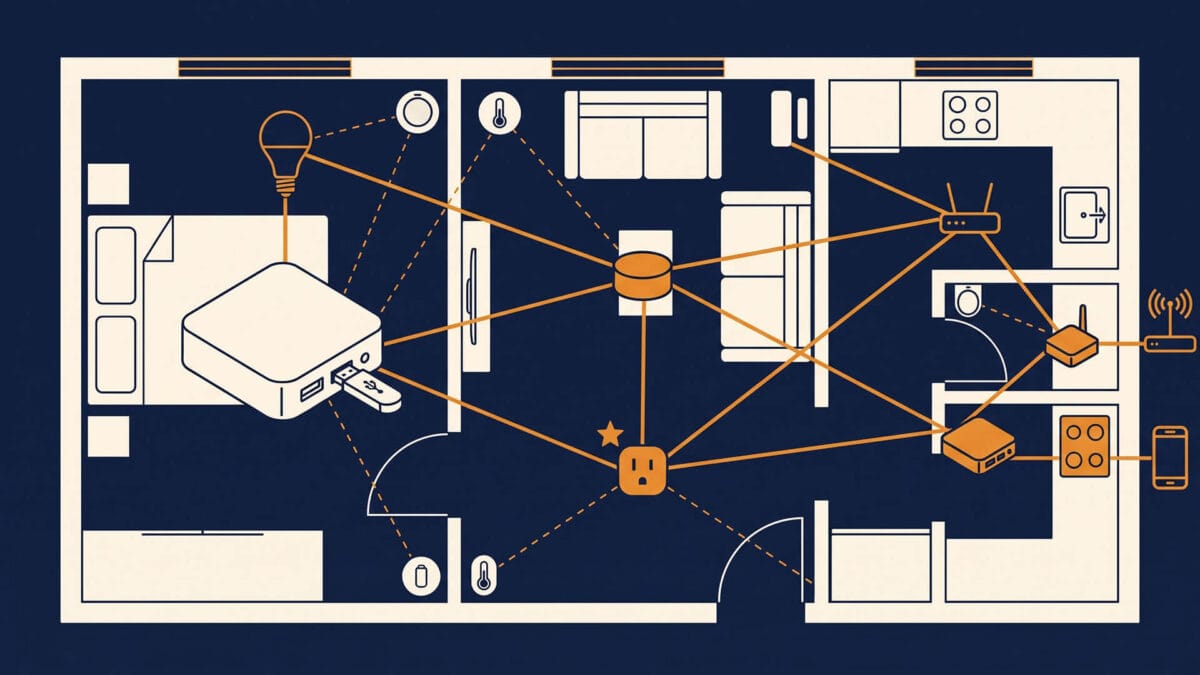
Thread’s infrastructure is already in many homes. The HomePod mini and some Apple TV models, several Google Nest devices and the Google TV Streamer, some Amazon Echo models, eero routers, and hubs from SmartThings and IKEA can act as Thread border routers. Not every model in a product line has a Thread radio, so check the spec sheet before you count on it. If you already own a border router, you can start using Thread devices without buying additional hardware.
Sleepy Thread devices reach battery life similar to Zigbee devices, and the mesh heals itself in the same way. The main structural difference is that Thread is IP based. Every device has an IPv6 address, so other devices and controllers can address it directly, the same way they address anything on an IP network.
Thread Pros and Cons
Thread’s strengths come from its design, and its limits come from its age.
Pros
- IP based, so every device has an address and can be reached directly
- No coordinator, since routers elect a leader and elect a new one if it fails
- Multiple border routers can serve one mesh, which adds redundancy when they share the same network
- Native transport for Matter, so devices work across ecosystems without a bridge
- Border routers already exist in many homes, so you may need no extra hardware
- Battery life comparable to Zigbee on sleepy devices
Cons
- Fewer devices available, especially sensors and switches
- Still maturing, and behavior differs between border router implementations
- Different ecosystems can create separate Thread networks in the same home, and Thread 1.4 credential sharing is meant to fix this but rollout is uneven so far
- Depends on your Matter controller, so a Thread device is only as good as the platform managing it
- Devices often cost more than Zigbee equivalents, though prices are coming down
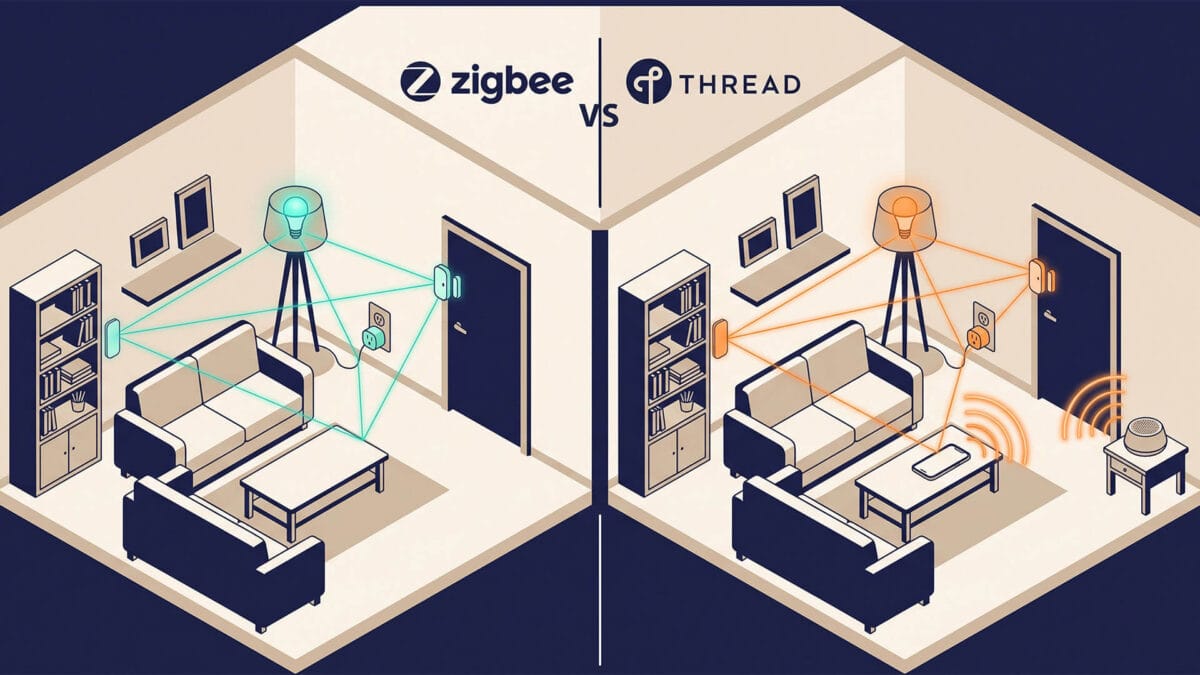
Zigbee vs Thread at a Glance
Both protocols share the same radio, and the table shows where they split.
| Feature | Zigbee | Thread |
|---|---|---|
| Radio | 802.15.4, 2.4 GHz | 802.15.4, 2.4 GHz |
| Network layer | Zigbee NWK | IPv6 |
| Application layer | Zigbee Cluster Library | Matter |
| IP based | No | Yes |
| Central device | Coordinator | None |
| Border router needed | No | Yes |
| Single point of failure | Coordinator | No |
| Self healing mesh | Yes | Yes |
| Battery life | Great | Great |
| Device range | Very large | Smaller, but growing |
| Device cost | Lower | Higher |
| Matter support | Via bridge | Native |
| Maturity | About 20 years | Newer |
What Zigbee Does Better
Zigbee wins on choice, cost, and track record.
Device choice and price. Zigbee has far more devices. If you want a motion sensor, a contact sensor, a smart plug, or a wireless button, you have dozens of options across many brands and price points. Inexpensive Zigbee sensors usually cost less than their Thread counterparts.
Maturity and tooling. Zigbee2MQTT and ZHA have years of device support behind them. Network maps, signal quality readings, and community fixes for odd devices are easy to find. When something misbehaves, someone has usually seen it before.
Local control in Home Assistant. Zigbee runs fully local, and Home Assistant supports it well. You pair devices to a coordinator you own, with no vendor hub and no cloud in the path.
Predictable behavior. Many Zigbee networks run for years without changes. You know how routers, end devices, and channels interact, and that makes problems easier to trace.
What Thread Does Better
Thread wins on Matter support, resilience, and how well it works across ecosystems.
Native Matter fit. Thread is the low power network layer Matter was designed around. A Matter over Thread device joins the same controllers as Wi-Fi and Ethernet Matter devices, with no bridge in between.
No coordinator to lose. Thread has no single device the network depends on. Routers elect a leader, and the mesh keeps running if that leader drops out. With more than one border router, you also have a backup path to the rest of your network.
Cleaner multi ecosystem use. A Matter device can belong to more than one ecosystem at the same time. The same sensor can work in Apple Home and in Home Assistant. A Zigbee device ties you to one coordinator.
Easier expansion. Every new border router extends the reach of the network. With Thread 1.4 credential sharing, border routers from different brands can join one mesh instead of forming separate ones. Support is still rolling out, so check your devices before you count on it.
What Is Matter and Matter over Thread
Matter is a smart home standard that defines how devices and controllers talk to each other. It launched in late 2022, and version 1.6 came out in June 2026. It sits on top of the network, so it does not replace Zigbee or Thread. Matter runs over Thread, Wi-Fi, or Ethernet.
A Matter controller, such as Apple Home, Google Home, Alexa, or Home Assistant, manages the devices you add. The goal is that a Matter device works with any Matter controller, and one device can belong to several at once.
Matter over Thread means Thread carries the messages and Matter defines what they mean. Thread supplies the low power mesh and the IPv6 addressing. Matter supplies the device types, the commands, and the way a controller talks to them.
When a device is Matter-certified, you simply scan the setup code with your phone, and the controller uses Bluetooth LE to hand the device the Thread network credentials. The device joins the mesh through a router, and the controller reaches it through a border router. From then on, the device talks in Matter messages over IPv6.
When you see Matter over Thread on a box, it tells you three things:
- The device uses Thread as its network
- The device speaks Matter
- You need a Thread border router and a Matter controller in your home
It does not tell you which features your controller supports. A device can pair without trouble and still miss features on one platform. A Thread device that does not support Matter needs its own app or hub, so check the label before you buy.
What About Your Zigbee Devices
Your Zigbee devices keep working, and they can join a Matter setup through a bridge. A Matter bridge speaks Zigbee on one side and Matter on the other. It shows each Zigbee device to your Matter controllers as if it were a Matter device. This is to only way to bridge Zigbee devices to Matter, as Zigbee is not part of the Matter specs and was not invited to the party.
Many vendor hubs already do this for their own devices. The Hue Bridge, IKEA’s Dirigera hub, and Aqara hubs can expose their Zigbee devices to Matter controllers. In a Home Assistant setup, community add-ons can expose entities, including Zigbee devices from Zigbee2MQTT or ZHA, to other Matter controllers. Check what the add-on supports before you rely on it.
A bridge does not turn a Zigbee device into a Thread device. The device still uses the Zigbee radio and still needs its Zigbee coordinator. Basic controls such as on and off, brightness, color, and contact state usually carry over. Manufacturer specific features, detailed settings, and some device types may not. Test one device first before you bridge everything.
Device Availability Today
The practical problem with Thread right now is device selection. If you want a Thread motion sensor, you have maybe half a dozen good options. If you want a Thread light switch, you are choosing between a handful of manufacturers. For Zigbee, you have dozens of options, and entire aisles of them online.
I firmly believe this will eventually change. It has already started changing, and major manufacturers are releasing Thread versions of their core products. But in 2026, Thread device selection is still catching up. Before you buy, check that a device supports Matter over Thread and not just Matter over Wi-Fi, because the two behave very differently in your home.
Which Should You Choose
Choose based on your controller, your existing devices, and what you still need to buy. There is no single right answer, but there is a right answer for each setup.
You are starting from scratch in an Apple, Google, or Alexa household. Start with Thread and Matter. You probably own a border router already, Matter devices work across ecosystems, and you are building on the standard manufacturers are moving toward. Where the device you need does not exist on Thread yet, a Zigbee device on a hub that bridges to Matter fills the gap.
You run Home Assistant with an existing Zigbee network. Keep the Zigbee network. It works, it is local, and replacing devices gains you very little. Add Thread for new devices where a good Thread version exists. Make sure you get a good Open Thread Border router first, because that’s where most people make mistakes.
You need a lot of sensors. Zigbee still has the widest choice and the lowest prices. Battery life is similar on both protocols, so device availability decides.
You are on a tight budget. Choose Zigbee. A USB coordinator and inexpensive sensors get you a working local system for little money. Thread has become easier to enter because many people already own a border router, but the devices often cost more.
You want the setup that needs the fewest changes over time. Use Thread and Matter for the parts you have not built yet, because that is where the industry is moving. Zigbee devices do not stop working when that happens, and you can bridge them.
You want both. Run both. Zigbee and Thread can coexist in the same home. Use Zigbee where device range matters and Thread where Matter support matters. They share the same radio band, so set them to different 802.15.4 channels and keep both away from your busiest Wi-Fi channel.
My Personal Setup
I maintain both a Zigbee and a Thread setup, and the Thread network is the one I am actively building on. The Zigbee network still runs reliably and handles older devices and sensors. New purchases go on Thread and Matter when a good Thread version of the device exists, and on Zigbee when it does not.
When someone asks me what to buy right now, I recommend Thread and Matter for new devices, unless budget or device range points to Zigbee.
Final Verdict
Zigbee is not going anywhere, and neither is Thread. Zigbee gives you the widest device choice, the lowest prices, and years of proven behavior. Thread gives you native Matter support, no coordinator to lose, and a network that works across ecosystems.
If you are building from scratch, you already own a border router, and the devices you need exist on Thread, buy Thread and Matter. If you already run Zigbee, or your budget and device list point that way, stay on Zigbee and bridge it to Matter when you need to. You do not have to rip anything out either way. Both networks can run side by side, and you can move over one device at a time.
Buy for the devices you need today, and pick the network that carries them best.
FAQ
Is Thread better than Zigbee in 2026?
Neither one is better in every case. Thread has native Matter support and no coordinator to lose. Zigbee has more devices, lower prices, and years of proven behavior. Choose Thread if the devices you need exist on it and your controller handles Matter well. Choose Zigbee when device range or budget matters more.
Can I use Zigbee and Thread in the same smart home?
Yes. Both use the same 2.4 GHz radio standard, so they can run side by side. Set them to different 802.15.4 channels and keep both away from your busiest Wi-Fi channel. Many people keep an existing Zigbee network and add Thread for new Matter devices.
Do I need a Thread border router to use Thread devices?
Yes, you need at least one. A border router connects the Thread mesh to your Wi-Fi or Ethernet network so your controller can reach the devices. You may already own one, such as a HomePod mini, some Apple TV models, several Google Nest devices, or a hub from SmartThings or IKEA. Not every model in a product line has a Thread radio, so check the spec sheet.
Will Matter replace Zigbee?
No. Matter is an application layer that runs over Thread, Wi-Fi, or Ethernet. It does not replace the Zigbee network. Zigbee devices keep working, and manufacturers still ship them in large numbers. More new devices now launch with Matter support, so the balance is shifting slowly.
Can Zigbee devices work with Matter?
Not directly. A Zigbee device does not speak Matter itself. A bridge exposes it to Matter controllers as if it were a Matter device. The Hue Bridge, IKEA’s Dirigera hub, and Aqara hubs do this for their own devices. Basic controls usually carry over, but manufacturer specific features may not.