Device Info
Available from
Notes and annotations
SmartWings does not sell individual motor, only complete window coverings with motors.
The Complete Matter Device List

SmartWings does not sell individual motor, only complete window coverings with motors.
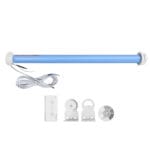
The SmartWings PoE Matter over Ethernet Motor from SmartWings connects to your smart home over Ethernet. It plugs straight into your router or network switch, and your Matter controller reaches it over your local network, without a Thread Border Router or extra hub.
Wired and Stable
A network cable gives the most stable connection, with no Wi-Fi interference, range limits or dropouts.
Same Network
Your phone, your controller and the device must be on the same network. Guest networks and separate VLANs can block Matter.
Network Port
Matter over Ethernet devices need a free LAN port on your router or network switch.
Every Matter device needs a Matter controller, like a smart hub, display or speaker. See all Matter hubs →
The SmartWings PoE Matter over Ethernet Motor is certified on Matter 1.3, released in May 2024. It added energy reporting for any device, plus EV chargers, water valves, leak and freeze sensors, ovens, cooktops, microwaves, extractor hoods and dryers. Scenes also became part of the standard.
Yes, but only a Matter controller from your platform, not a separate bridge. The SmartWings PoE Matter over Ethernet Motor connects straight to your home network. The controller can be an Apple home hub, a Google Nest speaker, an Amazon Echo or Home Assistant.
Yes. Matter runs on your local network, so the SmartWings PoE Matter over Ethernet Motor keeps working when your internet goes down. Remote access, voice assistants and some SmartWings cloud features may still need a working connection.
Yes. The SmartWings PoE Matter over Ethernet Motor is Matter certified, so it works with Apple Home, Google Home, Amazon Alexa, Samsung SmartThings and Home Assistant, as long as the platform supports Blinds & Shades devices. Support for newer device types can differ per platform.
No. Any Matter hub can set up and control the SmartWings PoE Matter over Ethernet Motor without the SmartWings app. Some advanced features may not be part of Matter yet, so settings like firmware updates or special modes can still require the SmartWings app.
Open your smart home app, choose to add a device and scan the Matter QR code on the SmartWings PoE Matter over Ethernet Motor or its packaging. You can also type in the 11-digit Matter code instead. The app guides you through the rest. Keep the code safe, you need it again after a reset.
Noticed an error? Submit a correction form.